
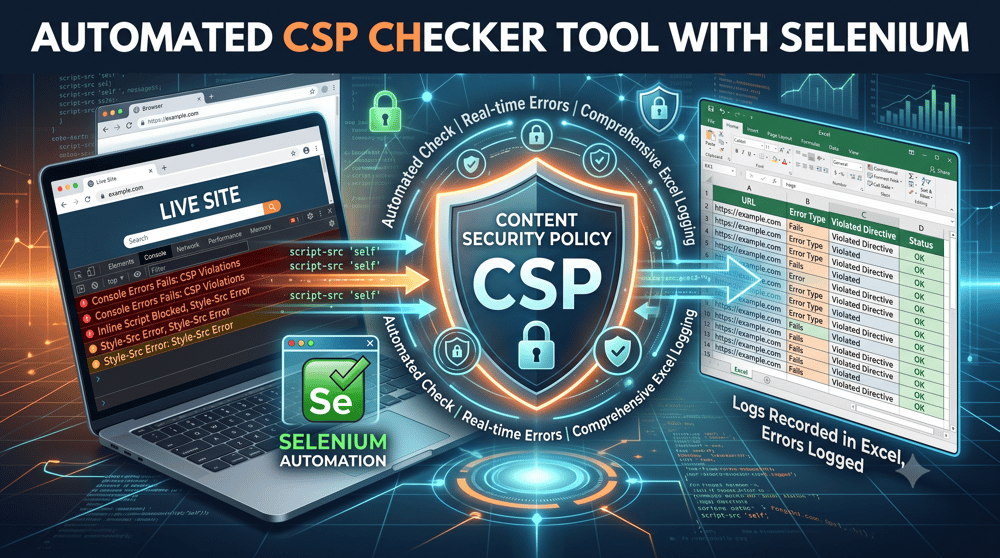
Enterprise websites depend on analytics, personalization, advertising platforms, APIs and third-party widgets. Content Security Policy helps reduce the risk of Cross-Site Scripting and unauthorized resource loading by controlling what a browser is permitted to load and execute.
The implementation challenge is validating that a policy does not unintentionally break legitimate functionality across different page types, components and user journeys. This article explains how automated browser-based CSP regression testing can replace repetitive manual validation across large websites.
Key takeaways
- CSP is a browser level security layer that controls which resources a page is allowed to load, blocking untrusted scripts and connections before they can execute.
- Different page templates, components and integrations may behave differently under the same CSP, so homepage testing alone is insufficient.
- Manual CSP testing across hundreds or thousands of pages is slow, inconsistent, and difficult to repeat with any reliability.
- Automated browser testing can scan large URL sets, capture runtime CSP violations and produce structured reports for engineering review.
- Interaction testing is important because some CSP violations appear only after users submit forms, open widgets or trigger API requests.
What is Content Security Policy (CSP)?
Content Security Policy is a security standard delivered through HTTP headers that tells the browser exactly which resources it is allowed to load and execute. Instead of trusting everything a page references, the browser enforces an allowlist that the team defines.
A CSP is built from directives such as:
- script-src to control which domains can serve JavaScript
- connect-src to control which APIs the page can contact
- img-src, style-src, and font-src to govern trusted images, styles, and fonts
Here is a simple example:
connect-src 'self' https://api.company.com
With this directive in place, the browser will:
- Allow requests to the same domain
- Allow calls to api.company.com
- Block every other external connection
That last behavior is the whole point. Anything not on the list gets stopped before it runs.
Why CSP matters for enterprise security?
CSP gives browsers additional control over which resources may load or execute, reducing the impact of injected or unauthorized content.
A well configured policy delivers real protection:
- It prevents XSS attacks by refusing untrusted inline and injected scripts.
- It blocks unauthorized third party scripts from executing on your pages.
- It protects sensitive user data from being exfiltrated to unknown endpoints.
- It enforces strict control over external integrations, which matters most when your stack depends on many vendors.
Without a properly configured CSP, applications become far easier to exploit, and the risk climbs with every new third party service you integrate.
Why CSP must be tested across different page types and user journeys?
CSP is usually configured globally, which creates a false sense of safety. The policy is one thing. The way each page behaves under that policy is another.
Different pages pull in different resources:
- They load different scripts and assets
- They call different APIs and analytics tools
- They embed iframes or external widgets
- They include user input forms with their own dependencies
That variation is where policies quietly fail. Consider a common pattern across a single site:
- Homepage loads cleanly with no violations
- Blog page has its analytics script blocked by the policy
- Contact page has its form submission blocked
The global policy may appear correct while specific templates, components or interactions still fail. Effective testing should cover distinct page templates, important component combinations, critical user journeys and pages containing unique third-party integrations. A broader lightweight URL scan can then identify page-specific exceptions.
The problem with manual CSP testing at scale
Enterprise sites are large by nature. A typical property might include hundreds or thousands of pages, dozens of third party integrations for ads, analytics, and tracking, plus dynamic and iframe based components that behave differently at runtime.
Testing all of that by hand means, for every page:
- Opening the page individually
- Inspecting the CSP headers
- Monitoring the browser console for violations
- Identifying and recording each blocked resource
- Reproducing interaction scenarios such as form submissions
At scale, this approach becomes slow, error prone, and effectively impractical for a human team to sustain across regular releases. Coverage gaps are almost guaranteed, and the results are hard to reproduce the next time the site changes.
How automated CSP testing works?
An automated CSP testing tool removes the manual grind and replaces it with consistent, repeatable coverage. Here is what a well designed solution does.
1. Automated multi-page scanning
The tool takes a list of URLs, launches a browser instance for each one, and loads every page exactly as a real user would. Coverage scales with the URL list rather than with team headcount.
2. CSP violation detection
As each page loads, the tool captures CSP violations directly from browser behavior, including errors such as a refused connection that violates a policy directive. For each violation it extracts the specific CSP directive involved, for example connect-src or script-src, along with the blocked resource URL.
3. Structured reporting
Every issue is logged into a structured Excel report that lists the page URL, the CSP directive that fired, and the blocked resources. That format makes it easy to analyze findings, prioritize fixes, and hand a clear worklist to the engineering team.
4. Intelligent form detection
Forms are one of the most important areas to validate, because CSP issues frequently surface only when a user interacts with a form. A strong tool detects and tests:
-
Forms available on the page
- Network requests triggered during submission
- Blocked form-action or API endpoints
- CSP violations generated after interaction
- The page URL, directive and blocked resource connected to each failure
This capability catches the failures that page load testing alone will miss, which is exactly where broken lead capture and lost conversions tend to hide.
What automated CSP testing does and does not prove?
Automated browser testing verifies how a CSP behaves on the pages and interactions covered by the test. It helps identify legitimate resources or functionality blocked by the policy.
However, a clean test report does not prove that the policy is secure. An overly permissive CSP may produce no violations while still providing weak protection. Policy-strength analysis should therefore be performed separately using tools such as Google CSP Evaluator.
Automated testing should also be combined with Content-security-policy-report-only monitoring. Report-Only mode collects violations from real browser sessions without blocking functionality, helping teams detect issues involving authenticated users, personalization, consent states and interactions that an automated crawler may not reproduce.
The business impact: reducing repetitive manual validation
The efficiency gain here is dramatic, and it shows up directly in delivery timelines and team allocation.
Manual effort depends on the number of URLs, templates, components and interactions being tested. Automation reduces repetitive browser inspection, provides consistent execution and makes CSP regression testing easier to repeat after future releases.
In our implementation, the tool enabled one engineer to scan a large URL set, capture runtime violations and generate a structured report for analysis. Exact savings will vary according to website size, test coverage, authentication requirements and interaction complexity.
Beyond raw speed, automated CSP testing delivers benefits that compound over time:
- A significant reduction in overall testing effort
- Faster identification of CSP issues before they reach production
- Stronger security compliance across releases
- Clearer visibility into how third party integrations behave on every page
Work that once consumed months from an entire team becomes a short, reliable task for a single engineer.
Making it fit your stack
A testing tool earns its place by adapting to your environment rather than forcing you to adapt to it. A well built CSP testing solution is straightforward to customize, so teams can:
- Modify the violation detection logic
- Adjust parsing rules for their specific header patterns
- Extend the reporting format to match internal standards
- Integrate the checks directly into CI/CD pipelines
That last point is where automated CSP testing becomes truly powerful. CSP regression tests can be integrated into a CI/CD workflow and executed against a deployed test or staging environment, allowing policy-related functionality issues to be detected before production release.
Closing thought
CSP is an important defence-in-depth control, but configuration review alone cannot show whether legitimate functionality works across a complex website. Automated browser testing closes part of this gap by validating representative pages, interactions and integrations at scale. It should be combined with policy-strength evaluation, Report-Only monitoring and broader application-security testing.
Automated CSP regression testing can become a valuable part of a mature CSP validation process for large and component-heavy websites.
Ready to secure your digital experience at scale?
If your CSP is difficult to validate, or you are not fully confident it holds up across every page and every release, Axeno can help.Frequently Asked Questions
What is CSP testing?
CSP testing evaluates both the strength of a policy and its runtime behaviour. Automated browser testing focuses on runtime compatibility by identifying resources or functionality blocked on tested pages and user journeys.
Why can't I just test my CSP configuration once?
A global policy can appear valid while particular templates, components, forms or integrations fail at runtime. Testing should therefore cover representative page types, critical interactions and unique integrations, supported by broader URL scanning where necessary.
How long does automated CSP testing take?
Execution time depends on the number of URLs, interactions, browser configurations and authenticated states being tested. Automation substantially reduces repetitive manual work, but no universal two-to-three-day estimate applies to every website.
What CSP violations does automated testing catch?
Automated testing captures violations directly from browser behavior, including blocked connections and scripts, and records the specific directive that fired, such as connect-src or script-src, along with the blocked resource URL.
Can CSP testing be added to a CI/CD pipeline?
Yes. Integrating CSP validation into CI/CD means the checks run automatically on every deploy, catching policy regressions at build time before they reach users.
-1.png)